Small report changes should not wait for a development sprint.
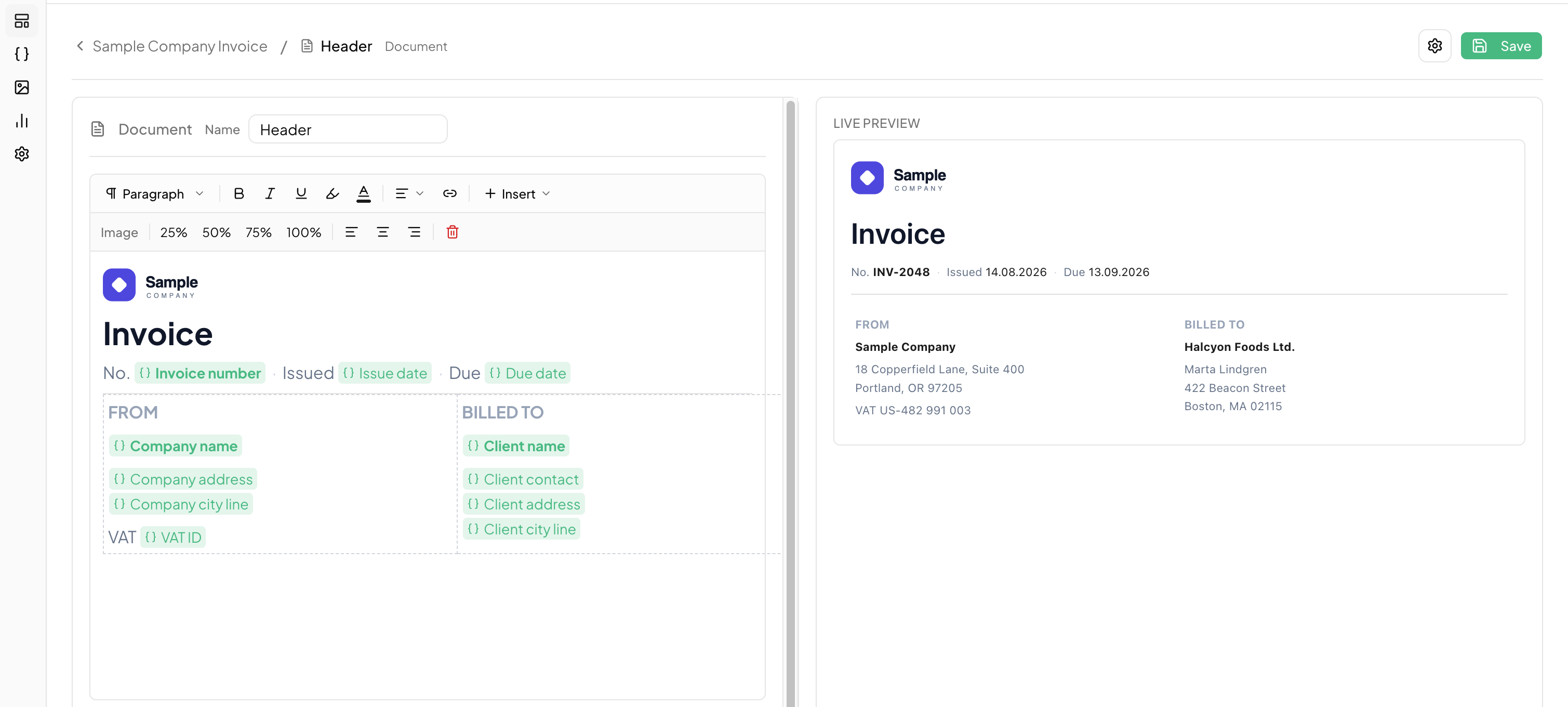
Reforgio helps SaaS teams manage report and document templates in a visual editor, while developers connect the data once through API.
Built for SaaS products that generate PDF reports, customer documents, invoices, certificates or operational exports.
Join the Reforgio waitlist.
Reforgio is in early access. We take teams in small groups so we can sit with each one and get a first report working properly.
What happens once you're in
- 1Pick one existing report or document
- 2Connect it to Reforgio with our technical support
- 3Rebuild the template in the visual editor
- 4Test simple changes without deployment
- 5Decide whether the workflow saves time for your team
Best fit: SaaS teams that already generate PDF reports or customer documents and keep getting asked for small changes to them.
Report changes pile up in the development backlog.
For many SaaS teams, customer-facing reports start simple. But as the customer base grows, every client wants something slightly different.
Too many small tickets
Column changes, labels, logos and layout tweaks keep landing in the development backlog.
Slow customer response
A simple report change can move through support, product, development, QA and deployment before the customer sees it.
Template chaos
Different customers often need different versions of the same report, making templates harder to maintain in code.
Developers lose focus
Engineering time gets pulled away from core product work and spent on repetitive document adjustments.
Move template changes out of the codebase.
Reforgio gives SaaS teams a visual place to create and manage document templates. Developers connect the application once through API. After that, product, support or customer-facing teams can make simple template changes without touching the SaaS codebase.
Before Reforgio
After Reforgio
How Reforgio works
Connect once through API
Developers generate an API key, connect Reforgio to the SaaS application and send structured data to selected templates.
Manage templates visually
Product, Support, Customer Success or Operations teams can edit layouts, tables, text, logos, formatting and template variants in a visual editor.
Generate documents inside your SaaS
The SaaS user clicks “Export PDF” or “Generate report”, and Reforgio returns a ready document based on the selected template and data.
Example use case: workforce management SaaS
A workforce management SaaS generates monthly work-time reports for restaurant and hotel customers.
Original report
Employee name, planned hours, worked hours, overtime, salary.
Customer request
One customer wants to hide the salary column and rename “overtime” to “extra hours”. Another customer wants the company logo and a different section order.
Without Reforgio
The change becomes a development task.
With Reforgio
Support or Product creates a customer-specific template variant, updates the columns and text, previews the report and saves the change.
Result
The customer gets the adjusted report faster, while developers stay focused on core product work.
Request
Template edit
Updated PDF
What non-technical teams can update
You can check a document against sample data before publishing it. Older versions are kept, so a change that goes wrong can be rolled back.
Built for SaaS products with document-heavy workflows
Reforgio is most useful when your SaaS generates many customer-facing documents, maintains multiple report variants or receives recurring requests for small document changes.
Frequently asked questions
PDF and XLSX files. Your application sends the data, Reforgio applies the template and hands the finished document back. PDF covers every kind of section. XLSX is built from table sections only. People use it for invoices, work-time reports, certificates, statements and operational exports.
Which report do your customers ask you to change most often?
Let’s test whether Reforgio can move one real document workflow from code to a visual template editor.
One example is enough to start.